Configure the Dynamic DNS using dyndns.org
1 min
If your Router does not allow to customize the Service, please follow this workaround:
1. Configure in your Router the following DNS: 185.236.104.104 | 185.236.105.105
2. Choose "Dyndns.org" as Service type
IMPORTANT: you DO NOT need to create any DynDns.org account ! We will redirect automatically Dyndns.org connections to the Webfilter.
Use Webfilter Username and Password in the configuration. (DO NOT use any DynDns.org credentials!)
Here is a common example:
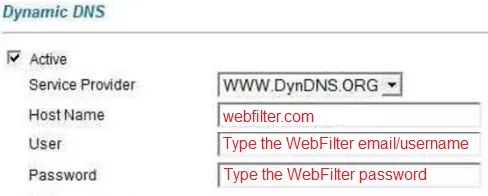
Dynamic DNS
Other ways to ask:
- How to configure the Dynamic DNS using dyndns.org
- Dynamic DNS using dyndns.org. How to configure.